Free for Mac, iPhone and iPad

Much smaller photos. No visible difference.

Tyniy shrinks your photos and videos while keeping them visually identical to the originals, so you get your storage back without giving up quality.

100% free. No ads, no subscriptions, no limits. Everything happens on your device.

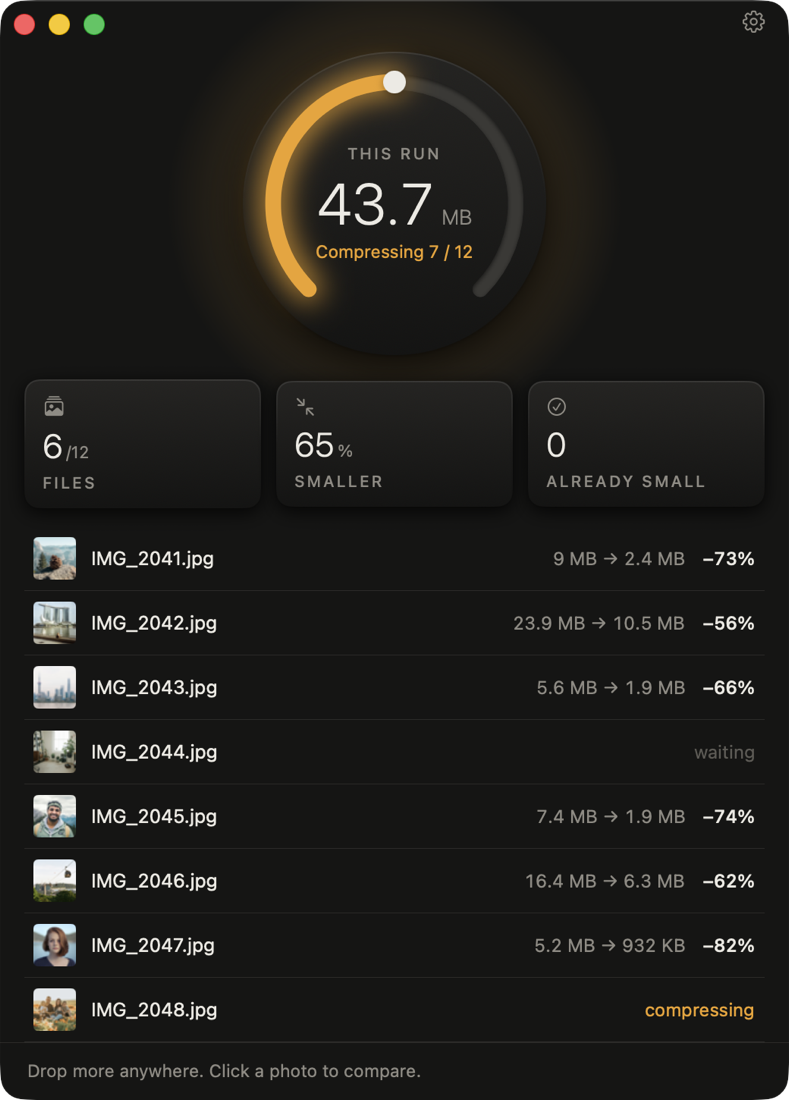
The Tyniy window after compressing 12 photos: 94 MB saved, 66% smaller The Tyniy window while compressing, in dark mode
Visually identical

Compare it yourself.

A 100% crop of a 24-megapixel photo before and after Tyniy. Drag the divider.

Detail after compression with Tyniy Detail of the original photo
ORIGINALTYNIY
Original
9.0MB
Tyniy
2.4MB
Smaller
73%

Whole-file sizes. For this page both crops were saved the same way, at high JPEG quality. Photo: Unsplash.

Drop and done

No settings to learn.

Tyniy works out how much each photo can be compressed without a visible change, so you don't have to.

1

Add photos

Drop photos or whole folders on the Mac, or pick them on iPhone and iPad from your library or straight from an SD card.

2

Tyniy compresses

Compression starts right away, several photos at once. Files that can't get meaningfully smaller are left exactly as they are.

3

Space is back

The smaller files take the originals' place. The originals go to the Trash or Recently Deleted, so you can always restore them.

Features

Simple outside. Careful inside.

Engine

jpegli encoder

Photos are encoded with jpegli, a modern JPEG encoder that targets what the human eye can actually see.

Safety

Originals you can restore

Replaced originals go to the Trash on the Mac and to Recently Deleted in Photos. On an SD card, Tyniy asks before overwriting.

Metadata

EXIF and colors kept

Camera, lens, date, GPS, orientation and color profiles carry over, so Display P3 and Adobe RGB photos keep their colors.

Formats

JPEG, HEIC, PNG, MP4, MOV

Optionally convert photos to WebP or AVIF for websites.

Screenshots

Much smaller PNGs

Screenshots and graphics shrink a lot while keeping transparency, sharp edges and Retina resolution.

Compare

See for yourself

Check any photo side by side with its original and zoom in to the pixel.

Mac

Watch folders

New photos and videos in folders you choose, like Desktop or Downloads, are compressed automatically.

Automation

Finder and Shortcuts

Right-click in Finder and choose "Compress with Tyniy", or use the "Compress Files" action in Shortcuts.

Privacy

Nothing leaves your device

No accounts, no uploads, no analytics. Tyniy works completely offline.

Tyniy for Mac compressing photos, the dial glowing orange
Tyniy for Mac

Whole photoshoots in one go.

Drop files or folders from your Mac, an SD card or an external drive. The dial fills as photos finish.

  • Replace originals, save next to them, or save to a folder
  • Watch folders with a menu bar icon
  • Finder right-click and Shortcuts action
Mac App StoreGet Tyniy for Mac
Tyniy on iPhone after compressing 8 photos Tyniy on iPhone while compressing, in dark mode
Tyniy for iPhone & iPad

Free up space, right in your library.

Pick photos and videos. Tyniy puts the smaller versions in your library with their original date, location, favorites and albums.

  • iOS asks you once to confirm a whole batch
  • Originals stay in Recently Deleted for 30 days
  • Compress photos right on an SD card, before you import them
App StoreGet Tyniy for iPhone
For photographers

Compress on the card, before you import.

Connect your camera's SD card to your iPhone or iPad with a card reader. Tyniy compresses the photos straight from the card, so only the smaller files end up in your library, your laptop or your cloud.

1

Plug in the card

Use any USB-C or Lightning SD card reader. The card shows up in the Files app, with no import needed.

2

Choose from Files

In Tyniy, tap Choose from Files and pick photos or the whole DCIM folder. Tyniy compresses them right away.

3

Replace on the card

Tap Save to Files, then Replace Originals. The smaller files take the originals' place on the card, ready to import.

A card has no Recently Deleted, so Tyniy asks before overwriting anything. Prefer to keep the originals? Save the smaller files to another folder instead. Works with JPEG, HEIC, PNG, MP4 and MOV, and with external SSDs and USB drives too.

A free JPEGmini alternative

Tyniy vs. JPEGmini

Both shrink photos without visible loss. Here's how they differ.

TyniyJPEGmini
PriceFree, no limitsFrom $59 one-time; free tier limited to 50 images a day
PlatformsMac, iPhone and iPadMac and Windows
Photo formatsJPEG, HEIC and PNGJPEG and HEIC
Output for websitesWebP and AVIFJPEG
VideosIncludedPro edition ($59) and up
Watch foldersIncluded (Mac)Pro + Automations edition ($99)
On-deviceYesYes

JPEGmini is a trademark of its owner. Based on jpegmini.com/pricing, October 2026.

Tyniy app icon

Get your storage back.

Free, private and simple. On Mac, iPhone and iPad.